
worldlink express service co.,ltd
We link the world 
We link the world




Sơ đồ tổng quan quy trình khai báo và khai sửa đổi bổ sung trong thông quan đối với hàng hóa nhập khẩu. 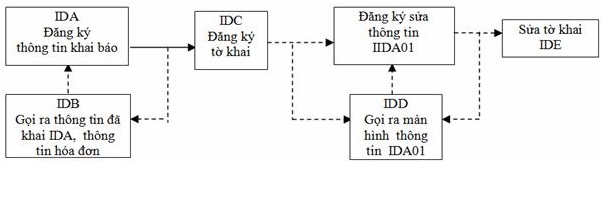
1. Khai thông tin nhập khẩu (IDA)
– Người khai hải quan khai các thông tin nhập khẩu bằng nghiệp vụ IDA trước khi đăng ký tờ khai nhập khẩu. Khi đã khai đầy đủ các chỉ tiêu trên màn hình IDA (133 chỉ tiêu), người khai hải quan gửi đến hệ thống VNACCS, hệ thống sẽ tự động cấp số, tự động xuất ra các chỉ tiêu liên quan đến thuế suất, tên tương ứng với các mã nhập vào (ví dụ: tên nước nhập khẩu tương ứng với mã nước, tên đơn vị nhập khẩu tương ứng với mã số doanh nghiệp…), tự động tính toán các chỉ tiêu liên quan đến trị giá, thuế… và phản hồi lại cho người khai hải quan tại màn hình đăng ký tờ khai – IDC.
– Khi hệ thống cấp số thì bản khai thông tin nhập khẩu IDA được lưu trên hệ thống VNACCS.
2. Đăng ký tờ khai nhập khẩu (IDC)
– Khi nhận được màn hình đăng ký tờ khai (IDC) do hệ thống phản hồi, người khai hải quan kiểm tra các thông tin đã khai báo, các thông tin do hệ thống tự động xuất ra, tính toán. Nếu khẳng định các thông tin là chính xác thì gửi đến hệ thống để đăng ký tờ khai.
– Trường hợp sau khi kiểm tra, người khai hải quan phát hiện có những thông tin khai báo không chính xác, cần sửa đổi thì phải sử dụng nghiệp vụ IDB gọi lại màn hình khai thông tin nhập khẩu (IDA) để sửa các thông tin cần thiết và thực hiện các công việc như đã hướng dẫn ở trên.
3. Kiểm tra điều kiện đăng ký tờ khai
Trước khi cho phép đăng ký tờ khai, hệ thống sẽ tự động kiểm tra Danh sách doanh nghiệp không đủ điều kiện đăng ký tờ khai (doanh nghiệp có nợ quá hạn quá 90 ngày, doanh nghiệp tạm dừng hoạt động, giải thể, phá sản…). Nếu doanh nghiệp thuộc danh sách nêu trên thì không được đăng ký tờ khai và hệ thống sẽ phản hồi lại cho người khai hải quan biết.
4. Phân luồng, kiểm tra, thông quan: Khi tờ khai đã được đăng ký, hệ thống tự động phân luồng, gồm 3 luồng xanh, vàng, đỏ
4.1 Đối với các tờ khai luồng xanh
– Trường hợp số thuế phải nộp bằng 0: Hệ thống tự động cấp phép thông quan (trong thời gian dự kiến 03 giây) và xuất ra cho người khai “Quyết định thông quan hàng hóa nhập khẩu”.
– Trường hợp số thuế phải nộp khác 0
+ Trường hợp đã khai báo nộp thuế bằng hạn mức hoặc thực hiện bảo lãnh (chung, riêng): Hệ thống tự động kiểm tra các chỉ tiêu khai báo liên quan đến hạn mức, bảo lãnh, nếu số tiền hạn mức hoặc bảo lãnh lớn hơn hoặc bằng số thuế phải nộp, hệ thống sẽ xuất ra cho người khai “chứng từ ghi số thuế phải thu” và “Quyết định thông quan hàng hóa nhập khẩu”. Nếu số tiền hạn mức hoặc bảo lãnh nhỏ hơn số thuế phải nộp, hệ thống sẽ báo lỗi.
+ Trường hợp khai báo nộp thuế ngay (chuyển khoản, nộp tiền mặt tại cơ quan hải quan….): Hệ thống xuất ra cho người khai “Chứng từ ghi số thuế phải thu”. Khi người khai hải quan đã thực hiện nộp thuế, phí, lệ phí và hệ thống VNACCS đã nhận thông tin về việc nộp thuế, phí, lệ phí thì hệ thống xuất ra “Quyết định thông quan hàng hóa”.
– Cuối ngày hệ thống VNACCS tập hợp toàn bộ tờ khai luồng xanh đã được thông quan chuyển sang hệ thống VCIS.
4.2 Đối với các tờ khai luồng vàng, đỏ
a. Người khai hải quan
– Nhận phản hồi của hệ thống về kết quả phân luồng, địa điểm, hình thức, mức độ kiểm tra thực tế hàng hoá;
– Nộp hồ sơ giấy để cơ quan hải quan kiểm tra chi tiết hồ sơ; chuẩn bị các điều kiện để kiểm thực tế hàng hoá;
– Thực hiện đầy đủ các nghĩa vụ về thuế, phí, lệ phí (nếu có).
b. Hệ thống
(1) Xuất ra cho người khai “Tờ khai hải quan” (có nêu rõ kết quả phân luồng tại chỉ tiêu: Mã phân loại kiểm tra)
(2) Xuất ra Thông báo yêu cầu kiểm tra thực tế hàng hóa đối với hàng hóa được phân vào luồng đỏ hoặc khi cơ quan hải quan sử dụng nghiệp vụ CKO để chuyển luồng.
(3) Ngay sau khi cơ quan hải quan thực hiện xong nghiệp vụ CEA hệ thống tự động thực hiện các công việc sau:
– Trường hợp số thuế phải nộp bằng 0: Hệ thống tự động cấp phép thông quan và xuất ra cho người khai “Quyết định thông quan hàng hóa”.
– Trường hợp số thuế phải nộp khác 0:
· Trường hợp đã khai báo nộp thuế bằng hạn mức hoặc thực hiện bảo lãnh (chung, riêng): Hệ thống tự động kiểm tra các chỉ tiêu khai báo liên quan đến hạn mức, bảo lãnh, nếu số tiền hạn mức hoặc bảo lãnh lớn hơn hoặc bằng số thuế phải nộp, hệ thống sẽ xuất ra cho người khai “chứng từ ghi số thuế phải thu” và “Quyết định thông quan hàng hóa”. Nếu số tiền hạn mức hoặc bảo lãnh nhỏ hơn số thuế phải nộp, hệ thống sẽ báo lỗi.
· Trường hợp khai báo nộp thuế ngay (chuyển khoản, nộp tiền mặt tại cơ quan hải quan….): Hệ thống xuất ra cho người khai “chứng từ ghi số thuế phải thu. Khi người khai hải quan đã thực hiện nộp thuế, phí, lệ phí và hệ thống VNACCS đã nhận thông tin về việc nộp thuế phí, lệ phí thì hệ thống xuất ra “Quyết định thông quan hàng hóa”.
5. Khai sửa đổi, bổ sung trong thông quan
(1) Hệ thống cho phép khai sửa đổi, bổ sung trong thông quan từ sau khi đăng ký tờ khai đến trước khi thông quan hàng hoá. Để thực hiện khai bổ sung trong thông quan, người khai hải quan sử dụng nghiệp vụ IDD gọi ra màn hình khai thông tin sửa đổi bổ sung được hiển thị toàn bộ thông tin tờ khai nhập khẩu (IDA) trong trường hợp khai sửa đổi, bổ sung lần đầu, hoặc hiển thị thông tin khai nhập khẩu sửa đổi cập nhật nhất (IDA01) trong trường hợp khai sửa đổi, bổ sung từ lần thứ 2 trở đi.
(2) Khi đã khai báo xong tại nghiệp vụ IDA01, người khai hải quan gửi đến hệ thống VNACCS, hệ thống sẽ cấp số cho tờ khai sửa đổi và phản hồi lại các thông tin tờ khai sửa đổi tại màn hình IDE, khi người khai hải quan ấn nút “gửi” tại màn hình này thì hoàn tất việc đăng ký tờ khai sửa đổi, bổ sung.
(3) Số tờ khai sửa đổi là kí tự cuối cùng của ô số tờ khai, số lần khai báo sửa đổi, bổ sung trong thông quan tối đa là 9 lần tương ứng với ký tự cuối cùng của số tờ khai từ 1 đến 9; trường hợp không khai bổ sung trong thông quan thì ký tự cuối cùng của số tờ khai là 0.
(4) Khi người khai hải quan khai sửa đổi, bổ sung tờ khai, thì tờ khai sửa đổi, bổ sung chỉ có thể được phân luồng vàng hoặc luồng đỏ (không phân luồng xanh).
(5) Các chỉ tiêu trên màn hình khai sửa đổi, bổ sung (IDA01) giống các chỉ tiêu trên màn hình khai thông tin nhập khẩu (IDA). Khác nhau là một số chỉ tiêu (sẽ nêu cụ thể tại phần hướng dẫn nghiệp vụ IDA01) không nhập được tại IDA01 do không được sửa đổi hoặc không thuộc đối tượng sửa đổi.
6. Những điểm cần lưu ý
(1) Mỗi tờ khai được khai tối đa 50 mặt hàng, trường hợp một lô hàng có trên 50 mặt hàng, người khai hải quan sẽ phải thực hiện khai báo trên nhiều tờ khai, các tờ khai của cùng một lô hàng được liên kết với nhau dựa trên số nhánh của tờ khai
(2) Trị giá tính thuế
– Khai báo trị giá: Ghép các chỉ tiêu của tờ khai trị giá theo phương pháp 1 vào tờ khai nhập khẩu; Đối các phương pháp khác, chỉ ghép một số chỉ tiêu kết quả vào tờ khai nhập khẩu, việc tính toán cụ thể trị giá theo từng phương pháp phải thực hiện trên tờ khai trị giá riêng.
– Tự động tính toán: Đối với các lô hàng đủ điều kiện áp dụng phương pháp trị giá giao dịch, người khai hải quan khai báo Tổng trị giá hoá đơn, tổng hệ số phân bổ trị giá, trị giá hoá đơn của từng dòng hàng, các khoản điều chỉnh, hệ số phân bổ các khoản điều chỉnh, trên cơ sở đó, hệ thống sẽ tự động phân bổ các khoản điều chỉnh và tự động tính trị giá tính thuế cho từng dòng hàng.
– Không tự động tính toán: Đối với các lô hàng đủ điều kiện áp dụng phương pháp trị giá giao dịch nhưng ngoài I và F còn có trên 5 khoản điều chỉnh khác hoặc việc phân bổ các khoản điều chỉnh không theo tỷ lệ trị giá thì hệ thống không tự động phân bổ, tính toán trị giá tính thuế; Đối với các trường hợp này, người khai hải quan khai báo, tính toán trị giá tính thuế của từng dòng hàng tại tờ khai trị giá riêng, sau đó điền kết quả vào ô “trị giá tính thuế” của từng dòng hàng.
(3) Tỷ giá tính thuế
Khi người khai hải quan thực hiện nghiệp vụ khai thông tin nhập khẩu IDA, hệ thống sẽ áp dụng tỷ giá tại ngày thực hiện nghiệp vụ này để tự động tính thuế:
– Trường hợp người khai hải quan thực hiện nghiệp vụ khai thông tin nhập khẩu IDA và đăng ký tờ khai IDC trong cùng một ngày hoặc trong 02 ngày có tỷ giá giống nhau thì hệ thống tự động giữ nguyên tỷ giá tính thuế;
– Trường hợp người khai hải quan thực hiện nghiệp vụ đăng ký tờ khai IDC (được tính là thời điểm người khai hải quan ấn nút “Gửi” tại màn hình IDC) tại ngày có tỷ giá khác với tỷ giá tại ngày khai thông tin nhập khẩu IDA thì hệ thống sẽ báo lỗi. Khi đó, người khai hải quan dùng nghiệp vụ IDB gọi bản IDA để khai báo lại – thực chất là chỉ cần gọi IDA và gửi luôn hệ thống sẽ tự động cập nhật lại tỷ giá theo ngày đăng ký tờ khai.
(4) Thuế suất
– Khi người khai hải quan thực hiện nghiệp vụ khai thông tin nhập khẩu IDA, hệ thống sẽ lấy thuế suất tại ngày dự kiến khai báo IDC để tự động điền vào ô thuế suất.
– Trường hợp thuế suất tại ngày IDC dự kiến khác thuế suất tại ngày IDC, thì khi người khai hải quan thực hiện nghiệp vụ đăng ký tờ khai IDC hệ thống sẽ báo lỗi, khi đó, người khai hải quan dùng nghiệp vụ IDB gọi bản IDA để khai báo lại – thực chất là chỉ cần gọi IDA và gửi luôn, hệ thống tự động cập nhật lại thuế suất theo ngày đăng ký tờ khai IDC.
– Trường hợp người khai hải quan nhập mức thuế suất thủ công thì hệ thống xuất ra chữ “M” bên cạnh ô thuế suất.
(5) Trường hợp hàng hóa thuộc đối tượng miễn/giảm/không chịu thuế
– Việc xác định hàng hóa thuộc đối tượng được miễn thuế XK không căn cứ vào Bảng mã miễn/giảm/không chịu thuế, mà phải thực hiện theo các văn bản quy định, hướng dẫn liên quan.
– Chỉ sau khi đã xác định được hàng hóa thuộc đối tượng được miễn thuế XK mới áp mã dùng trong VNACCS theo Bảng mã miễn/giảm/không chịu thuế.
– Nhập mã miễn/giảm/không chịu thuế vào chỉ tiêu tương ứng trên màn hình đăng ký khai báo nhập khẩu (IDA).
– Trường hợp hàng hóa thuộc đối tượng miễn thuế nhập khẩu thuộc diện phải đăng ký DMMT trên VNACCS (TEA) thì phải nhập đủ cả mã miễn thuế và số DMMT, số thứ tự dòng hàng trong DMMT đã đăng ký trên VNACCS.
– Trường hợp hàng hóa thuộc đối tượng miễn thuế Nhập khẩu thuộc diện phải đăng ký DMMT nhưng đăng ký thủ công ngoài VNACCS thì phải nhập mã miễn thuế và ghi số DMMT vào phần ghi chú.
(6) Trường hợp hàng hóa chịu thuế giá trị gia tăng
– Việc xác định hàng hóa, thuế suất giá trị gia tăng không căn cứ vào Bảng mã thuế suất thuế giá trị gia tăng; mà phải thực hiện theo các văn bản quy định, hướng dẫn liên quan.- Chỉ sau khi đã xác định được hàng hóa, thuế suất cụ thể theo các văn bản quy định, hướng dẫn liên quan mới áp mã dùng trong VNACCS theo Bảng mã thuế suất thuế giá trị gia tăng.
– Nhập mã thuế suất thuế giá trị gia tăng vào chỉ tiêu tương ứng trên màn hình đăng ký khai báo nhập khẩu (IDA).
(7) Trường hợp doanh nghiệp không đủ điều kiện đăng ký tờ khai (do có nợ quá hạn quá 90 ngày hoặc Doanh nghiệp giải thể, phá sản, tạm ngừng kinh doanh,…)
Hệ thống tự động từ chối cấp số tờ khai và báo lỗi cho phía người khai lý do từ chối tiếp nhận khai báo. Tuy nhiên, nếu hàng nhập khẩu phục vụ trực tiếp an ninh, quốc phòng, phòng chống thiên tai, dịch bệnh, cứu trợ khẩn cấp, hàng viện trợ nhân đạo, viện trợ không hoàn lại thì hệ thống vẫn chấp nhận đăng ký tờ khai dù doanh nghiệp thuộc danh sách nêu trên.
(8) Trường hợp đăng ký bảo lãnh riêng trước khi cấp số tờ khai (bảo lãnh theo số vận đơn/hóa đơn)
Số vận đơn hoặc số hóa đơn đã đăng ký trong chứng từ bảo lãnh phải khớp với số vận đơn/số hóa đơn người khai khai báo trên màn hình nhập liệu.
Nếu đăng ký bảo lãnh riêng sau khi hệ thống cấp số tờ khai thì số tờ khai đã đăng ký trong chứng từ bảo lãnh phải khớp với số tờ khai hệ thống đã cấp.
(9) Trường hợp cùng một mặt hàng nhưng các sắc thuế có thời hạn nộp thuế khác nhau
Hệ thống sẽ tự động xuất ra các chứng từ ghi số thuế phải thu tương ứng với từng thời hạn nộp thuế. Trường hợp người khai làm thủ tục nhập khẩu nhiều mặt hàng nhưng các mặt hàng có thời hạn nộp thuế khác nhau, người khai sẽ phải khai trên các tờ khai khác nhau tương ứng với từng thời hạn nộp thuế.
*Cách thức thực hiện:
Việc khai, tiếp nhận, xử lý thông tin khai hải quan, trao đổi các thông tin khác theo quy định của pháp luật về thủ tục hải quan giữa các bên có liên quan thực hiện thông qua Hệ thống xử lý dữ liệu điện tử hải quan;
*Thành phần, số lượng hồ sơ:
– Thành phần hồ sơ:
+ Tờ khai hàng hoá nhập khẩu.
+ Các chứng từ đi kèm tờ khai (dạng điện tử hoặc văn bản giấy): theo quy định tại Điều 24 Luật Hải quan.
– Số lượng hồ sơ: 01 bản giấy hoặc điện tử.
*Thời hạn giải quyết:
– Hệ thống phản hồi cho người khai hải quan ngay sau khi hệ thống tiếp nhận, công chức hải quan chấp nhận kết quả phân luồng/từ chối tờ khai trừ các trường hợp bất khả như nghẽn mạng, hệ thống đường truyền gặp sự cố…
– Thời hạn hoàn thành thành kiểm tra thực tế hàng hóa, phương tiện vận tải (tính từ thời điểm người khai hải quan đã thực hiện đầy đủ các yêu cầu về làm thủ tục hải quan theo quy định tại điểm a và điểm b khoản 2 Điều 23 Luật Hải quan):
+ Chậm nhất là 08 giờ làm việc đối với lô hàng xuất khẩu áp dụng hình thức kiểm tra thực tế một phần hàng hóa theo xác suất;
+ Chậm nhất là 02 ngày làm việc đối với lô hàng xuất khẩu áp dụng hình thực kiểm tra thực tế toàn bộ hàng hóa.
Trong trường hợp áp dụng hình thức kiểm tra thực tế toàn bộ hàng hóa mà lô hàng xuất khẩu có số lượng lớn, việc kiểm tra phức tạp thì thời hạn kiểm tra có thể được gia hạn nhưng không quá 08 giờ làm việc.
*Đối tượng thực hiện thủ tục hành chính: Tổ chức, cá nhân
* Cơ quan thực hiện thủ tục hành chính:
– Cơ quan có thẩm quyền quyết định: Chi cục hải quan
– Người có thẩm quyền được ủy quyền hoặc phân cấp thực hiện: Không
– Cơ quan trực tiếp thực hiện thủ tục hành chính: Chi cục hải quan
– Cơ quan phối hợp (nếu có):
*Kết quả thực hiện thủ tục hành chính: Quyết định thông quan hàng hóa
* Yêu cầu, điều kiện thực hiện thủ tục hành chính:
Trước khi thực hiện thủ tục hải quan, người khai hải quan phải:
– Có chữ ký số được đăng ký;
– Đăng ký người sử dụng Hệ thống VNACCS/VCIS;
– Làm thủ tục cấp mã địa điểm kiểm tra hàng hóa xuất khẩu, nhập khẩu. Trường hợp doanh nghiệp không được công nhận địa điểm kiểm tra tại chân công trình, cơ sở sản xuất, nhà máy, doanh nghiệp phải đưa hàng hoá đến địa điểm kiểm tra tập trung để kiểm tra (áp dụng đối với các lô hàng được hệ thống VNACCS phân vào luồng đỏ).
Theo tài liệu đào tạo của Viện Logistics VLI (2017)
Import Information Declaration (IDA)
– Before registering an import declaration, the customs declarant shall declare import information using the IDA procedure. After completing all information fields on the IDA screen (133 fields), the customs declarant submits the information to the VNACCS system. The system will automatically assign a number, automatically generate information related to tax rates and names corresponding to the entered codes (for example: the name of the importing country corresponding to the country code, the name of the importing entity corresponding to the enterprise code, etc.), automatically calculate values related to customs value, taxes, and other relevant indicators, and then return the results to the customs declarant on the Import Declaration Registration screen (IDC).
– Once the system assigns a number, the IDA import information declaration is stored in the VNACCS system.
Import Declaration Registration (IDC)
– Upon receiving the Import Declaration Registration screen (IDC) returned by the system, the customs declarant shall review the declared information as well as the information automatically generated and calculated by the system. If all information is confirmed to be accurate, the customs declarant shall submit it to the system to register the declaration.
– If, after review, the customs declarant discovers any inaccurate information requiring amendment, the IDB procedure must be used to recall the Import Information Declaration screen (IDA) for necessary corrections and then repeat the above-mentioned procedures.
Verification of Declaration Registration Eligibility
Before allowing a declaration to be registered, the system automatically checks the list of enterprises that are not eligible to register customs declarations (enterprises with overdue debts exceeding 90 days, suspended enterprises, dissolved enterprises, bankrupt enterprises, etc.).
If the enterprise is included in this list, the declaration cannot be registered, and the system will notify the customs declarant accordingly.
Channel Assignment, Inspection, and Customs Clearance
Once a declaration has been registered, the system automatically assigns one of three inspection channels:
Green Channel
Yellow Channel
Red Channel
4.1 Green Channel Declarations
– Where the payable tax amount is zero:
The system automatically grants customs clearance approval (within an estimated time of 03 seconds) and issues an “Import Goods Customs Clearance Decision” to the customs declarant.
– Where the payable tax amount is greater than zero:
In cases where tax payment is declared under a credit limit or a guarantee arrangement (general or specific guarantee):
The system automatically checks the declared information relating to the credit limit or guarantee. If the available credit limit or guaranteed amount is equal to or greater than the payable tax amount, the system issues a “Tax Collection Record” and an “Import Goods Customs Clearance Decision” to the customs declarant. If the available amount is less than the payable tax amount, the system will return an error notification.
In cases where immediate tax payment is declared (bank transfer, cash payment at the customs authority, etc.):
The system issues a “Tax Collection Record” to the customs declarant. After the customs declarant has completed the payment of taxes, fees, and charges, and the VNACCS system has received confirmation of such payment, the system issues a “Customs Clearance Decision”.
– At the end of the day, the VNACCS system compiles all cleared Green Channel declarations and transfers them to the VCIS system.
4.2 Yellow Channel and Red Channel Declarations
a. Customs Declarant
– Receive the system’s response regarding the channel assignment result, inspection location, inspection method, and level of physical inspection of goods;
– Submit paper documents for detailed document inspection by the customs authority; prepare the necessary conditions for physical inspection of goods;
– Fulfill all obligations relating to taxes, fees, and charges (if any).
b. The System
(1) Issue a “Customs Declaration” to the customs declarant (clearly indicating the channel assignment result in the Inspection Classification Code field).
(2) Issue a Notice Requesting Physical Inspection of Goods for shipments assigned to the Red Channel or when the customs authority uses the CKO procedure to change the inspection channel.
(3) Immediately after the customs authority completes the CEA procedure, the system automatically performs the following actions:
– Where the payable tax amount is zero:
The system automatically grants customs clearance and issues a “Customs Clearance Decision” to the customs declarant.
– Where the payable tax amount is greater than zero:
• In cases where tax payment is declared under a credit limit or guarantee arrangement (general or specific guarantee):
The system automatically checks the declared information relating to the credit limit or guarantee. If the available credit limit or guaranteed amount is equal to or greater than the payable tax amount, the system issues a “Tax Collection Record” and a “Customs Clearance Decision”. If the available amount is less than the payable tax amount, the system will return an error notification.
• In cases where immediate tax payment is declared (bank transfer, cash payment at the customs authority, etc.):
The system issues a “Tax Collection Record”. Once the customs declarant has paid all taxes, fees, and charges and the VNACCS system has received confirmation of such payment, the system issues a “Customs Clearance Decision”.
Declaration Amendment and Supplementation During Customs Clearance
(1) The system allows amendments and supplementary declarations from the time a declaration is registered until before customs clearance is completed.
To make an amendment or supplementary declaration during customs clearance, the customs declarant uses the IDD procedure to access the amendment and supplementation screen. This screen displays all information of the import declaration (IDA) for the first amendment, or the most recently updated amended import declaration information (IDA01) for the second and subsequent amendments.
(2) After completing the declaration on the IDA01 screen, the customs declarant submits it to the VNACCS system. The system assigns an amendment declaration number and returns the amended declaration information on the IDE screen. Once the customs declarant clicks the “Submit” button on this screen, the registration of the amendment or supplementary declaration is completed.
(3) The amendment declaration number is represented by the last digit of the declaration number field. The maximum number of amendments or supplementary declarations during customs clearance is nine (09), corresponding to the digits from 1 to 9. If no amendment or supplementary declaration is made, the last digit of the declaration number is 0.
(4) When a customs declarant amends or supplements a declaration, the amended declaration may only be assigned to the Yellow Channel or Red Channel (it cannot be assigned to the Green Channel).
(5) The information fields on the amendment and supplementation screen (IDA01) are the same as those on the Import Information Declaration screen (IDA). The difference is that certain fields (which will be specifically explained in the IDA01 procedure guidelines) cannot be entered in IDA01 because they are either non-amendable or not subject to amendment.
6. Important Notes
(1) Each declaration may contain a maximum of 50 items. If a shipment contains more than 50 items, the customs declarant must submit multiple declarations. The declarations belonging to the same shipment are linked together through the branch number of the declaration.
(2) Dutiable Value
– Value Declaration:
The indicators of the customs valuation declaration under Method 1 are integrated into the import declaration. For other valuation methods, only certain result indicators are integrated into the import declaration, while detailed calculations under each method must be performed on a separate customs valuation declaration.
– Automatic Calculation:
For shipments eligible for the transaction value method, the customs declarant shall declare the total invoice value, total allocation coefficient, invoice value of each item line, adjustment amounts, and allocation coefficients for adjustments. Based on this information, the system automatically allocates the adjustments and calculates the dutiable value for each item line.
– Non-Automatic Calculation:
For shipments eligible for the transaction value method but having more than five adjustment items in addition to I and F, or where adjustments are not allocated proportionally to value, the system will not automatically allocate or calculate the dutiable value. In such cases, the customs declarant must calculate the dutiable value for each item line on a separate customs valuation declaration and then enter the result into the “Dutiable Value” field for each item line.
(3) Exchange Rate for Tax Calculation
When the customs declarant performs the IDA import information declaration procedure, the system applies the exchange rate valid on that date to automatically calculate taxes.
– If the customs declarant performs the IDA procedure and registers the IDC declaration on the same day, or on two days with the same exchange rate, the system automatically retains the original exchange rate.
– If the customs declarant registers the IDC declaration (the moment the “Submit” button is clicked on the IDC screen) on a day with an exchange rate different from that used on the IDA declaration date, the system will generate an error. In this case, the customs declarant must use the IDB procedure to recall the IDA declaration and resubmit it so that the system automatically updates the exchange rate according to the declaration registration date.
(4) Tax Rates
– When the customs declarant performs the IDA procedure, the system automatically applies the tax rate expected to be effective on the IDC registration date.
– If the expected IDC tax rate differs from the actual tax rate on the IDC registration date, the system will generate an error when the IDC declaration is submitted. The customs declarant must then use the IDB procedure to recall the IDA declaration and resubmit it so that the system automatically updates the tax rate according to the actual IDC registration date.
– If the customs declarant manually enters a tax rate, the system displays the letter “M” next to the tax rate field.
(5) Goods Eligible for Tax Exemption, Reduction, or Non-Taxable Status
– Determination of export goods eligible for tax exemption must not be based solely on the Tax Exemption/Reduction/Non-Taxable Code Table, but must comply with relevant legal regulations and guidelines.
– Only after determining that the goods qualify for export tax exemption should the appropriate code from the VNACCS Tax Exemption/Reduction/Non-Taxable Code Table be applied.
– The exemption/reduction/non-taxable code must be entered in the corresponding field on the Import Declaration Registration screen (IDA).
– If imported goods eligible for tax exemption are subject to DMMT registration on VNACCS (TEA), both the exemption code and the DMMT number, together with the item line number in the registered DMMT, must be declared.
– If imported goods eligible for tax exemption are subject to manual DMMT registration outside VNACCS, the exemption code must be declared and the DMMT number entered in the remarks section.
(6) Goods Subject to Value Added Tax (VAT)
– Determination of VAT-liable goods and applicable VAT rates must not rely solely on the VAT Rate Code Table, but must comply with relevant legal regulations and guidelines.
– Only after determining the applicable VAT rate under the relevant regulations should the corresponding code from the VNACCS VAT Rate Code Table be used.
– The VAT rate code must be entered in the corresponding field on the Import Declaration Registration screen (IDA).
(7) Enterprises Not Eligible to Register Declarations
(Enterprises with overdue debts exceeding 90 days, dissolved enterprises, bankrupt enterprises, suspended enterprises, etc.)
The system automatically refuses to assign a declaration number and notifies the customs declarant of the reason for rejection.
However, declarations for imported goods directly serving national security, national defense, disaster prevention, disease control, emergency relief, humanitarian aid, or non-refundable aid will still be accepted even if the enterprise belongs to the ineligible list.
(8) Registration of a Specific Guarantee Before Declaration Number Assignment
(Guarantee based on Bill of Lading/Invoice Number)
The Bill of Lading number or invoice number registered in the guarantee document must match the Bill of Lading number or invoice number declared on the input screen.
If a specific guarantee is registered after the declaration number has been assigned, the declaration number registered in the guarantee document must match the declaration number assigned by the system.
(9) Same Goods Subject to Different Tax Payment Deadlines
The system automatically generates separate tax collection records corresponding to each tax payment deadline.
If multiple imported goods are subject to different tax payment deadlines, the customs declarant must submit separate declarations corresponding to each deadline.
Method of Implementation
The declaration, receipt, processing of customs declaration information, and exchange of other information as prescribed by customs regulations between relevant parties shall be conducted through the Electronic Customs Data Processing System.
Composition and Quantity of Dossiers
– Dossier Components:
* Import Goods Declaration.
* Supporting documents attached to the declaration (electronic or paper form) as prescribed in Article 24 of the Customs Law.
– Number of Dossiers:
01 paper dossier or electronic dossier.
Processing Time
– The system responds to the customs declarant immediately after receiving the declaration and after the customs officer accepts the channel assignment result or rejects the declaration, except in force majeure cases such as network congestion or transmission system failures.
– Deadline for completing the physical inspection of goods and means of transport (counted from the time the customs declarant has fulfilled all customs procedure requirements prescribed at Points a and b, Clause 2, Article 23 of the Customs Law):
* No later than 08 working hours for export shipments subject to partial physical inspection based on sampling.
* No later than 02 working days for export shipments subject to full physical inspection.
Where a shipment subject to full physical inspection is large in quantity or involves complex inspection procedures, the inspection period may be extended but shall not exceed 08 additional working hours.
Entities Entitled to Carry Out Administrative Procedures
– Organizations and individuals.
Authorities Responsible for Administrative Procedures
– Competent authority making decisions: Customs Sub-Department.
– Authorized or delegated authority: None.
– Authority directly implementing administrative procedures: Customs Sub-Department.
– Coordinating authority (if any): None specified.
Result of Administrative Procedure
– Customs Clearance Decision.
Requirements and Conditions for Administrative Procedures
Before carrying out customs procedures, the customs declarant must:
– Possess a registered digital signature.
– Register as a user of the VNACCS/VCIS System.
– Complete procedures for obtaining a code for the import/export goods inspection location.
Where an enterprise is not recognized as having an inspection location at the construction site, production facility, or factory, the enterprise must transport the goods to a centralized inspection location for inspection (applicable to shipments assigned to the Red Channel by the VNACCS system).
Source: Training Materials of the Vietnam Logistics Institute (VLI), 2017.